Automatic COGS in Shopify at Receipt: Weighted Average Cost (WAC) After Stocky

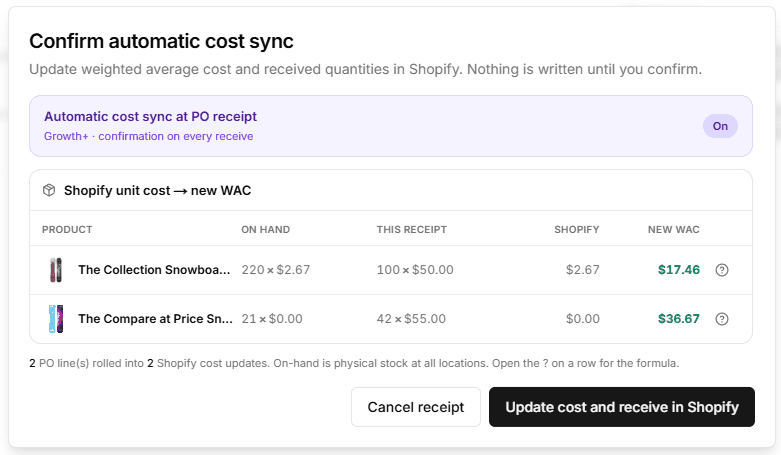
If your team is moving off Stocky and still wants cost in Shopify to move with receipts, not just quantities, you’re looking for an explicit weighted average cost (WAC) step at receive time. Inventory Mate supports that pattern as an optional shop default (on supported plans), with a confirmation screen before Shopify is updated.
Shopify is great at selling, locations, and inventory quantities. What it does not fully spell out for every merchant is a classic perpetual inventory story: “When this shipment lands, what is my new average unit cost—and write that back to the variant so my margins in Admin stay honest?”
That is exactly the workflow many teams used Stocky-adjacent mental models for: receive the PO, blend old stock with the new receipt, push a fresh unit cost alongside the quantity change.
Inventory Mate’s automatic cost sync at receipt is built for that same operational moment.
What gets averaged (in plain language)
When you save a receive on a purchase order, the app can look at:
- What you already had on hand at all Shopify locations (and the unit cost Shopify currently holds for that inventory item, if any). Shopify unit cost is shop-wide, not per location.
- What you are receiving now—the quantity delta on this save and the PO line unit cost for that inventory item.
It then computes a new weighted average cost per unit and can write that value to Shopify’s variant / inventory item unit cost before the received quantities are applied.
So you are not “replacing cost with the PO line only.” You are blending shelf and shipment.
Where it starts: receive inventory on the PO
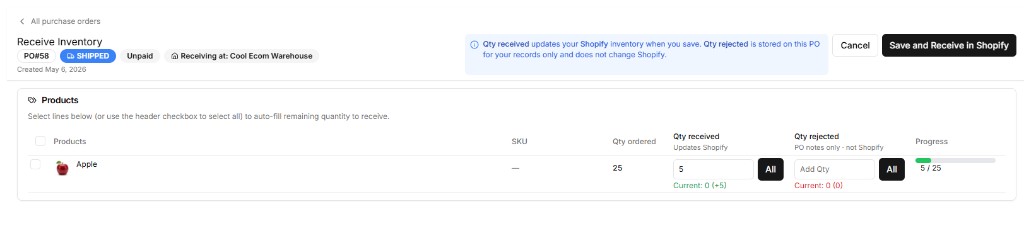
You enter additional qty received (and optionally qty rejected for your PO notes). When you save, Inventory Mate can load live on-hand across all locations and live Shopify unit cost, then blend with the PO line cost for this receive.
The formula (perpetual WAC at receipt)
In math form:
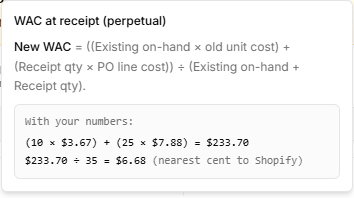
New WAC = ((Existing on-hand × old unit cost) + (Receipt qty × PO line cost)) ÷ (Existing on-hand + Receipt qty)
- Existing on-hand — Live physical on-hand quantity (
on_hand) summed across every location. Shopify stores one unit cost per inventory item, so stock at other locations is part of the blend. WAC uses the physical count because a unit reserved or committed is still part of your cost basis, even if it is not yet sellable. Note: the Stock Replenishment table uses Shopify'savailablequantity (on_hand minus committed/reserved) to match the Shopify admin — this flow useson_handspecifically for accounting accuracy. - Old unit cost — Live Shopify unit cost for that inventory item. If Shopify has no cost stored, the “existing” leg is treated as $0 so the receipt still moves the average in a predictable way.
- Receipt qty — The additional units you are receiving on this save.
- PO line cost — The unit cost from the purchase order line (if multiple PO lines for the same inventory item are received together, the receipt leg is value-weighted across those lines).
The result is rounded to the nearest cent before it is sent to Shopify, so what you approve is what the API receives.
For the full technical notes (plans, destination resolution, differences from the SKU COGS report), see the product doc: PO receipt — weighted average cost sync to Shopify.
“Stocky-equivalent” in practice
We use that phrase carefully. Stocky did many things; this feature is scoped to one of the workflows merchants keep asking for after a sunset: at receipt time, optionally recompute COGS-style unit cost and sync it to Shopify in the same breath as posting received inventory.
It is not a full accounting subledger. It is a disciplined, receipt-tied way to keep Shopify unit cost aligned with a perpetual WAC mental model your purchasing team already uses.
The confirmation step (nothing happens until you say so)
When automatic cost sync is on and you are about to receive inventory that triggers a cost write, Inventory Mate always opens a confirmation first.
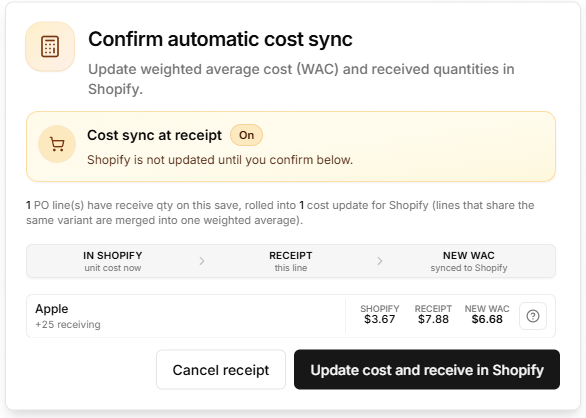
You’ll see, for each affected line:
- On hand — physical stock at all locations × the unit cost Shopify holds today.
- This receipt — quantity on this save × the PO line unit cost.
- Shopify — unit cost today (or $0.00 when Shopify has no cost).
- New WAC — the blended average that will be written first to Shopify.
The summary line at the top clarifies how many PO lines are receiving on this save versus how many Shopify cost updates will run (lines that share the same variant are merged into one weighted average per inventory item).
Each line also includes a short help control that shows already on hand + just received with your live numbers, then the new weighted average per unit (rounded to the nearest cent before Shopify).
From there you choose:
- Cancel receipt — No cost update, no quantity update, and the receive attempt does not complete.
- Update cost and receive in Shopify — Costs are updated, then quantities, then the purchase order save continues as usual.
That’s the guardrail teams expect when COGS and inventory move together: review, then commit.
Who this is for
This path matters most when:
- You treat Shopify unit cost as a living average, not a static placeholder.
- You want receiving to be a single trusted moment—“the shipment landed, so our average cost and on-hand should both move.”
- You are standardizing how operations works after Stocky, without handing every receipt to a spreadsheet first.
If that sounds like your team, turn the option on in shop defaults, run a small test receive, and read the confirmation screen as your sanity check. The docs above cover enablement, edge cases, and how this differs from the SKU COGS report’s date-range WAC—worth a bookmark for whoever owns inventory accounting.