Your Open POs Now Show as Incoming in Shopify Admin

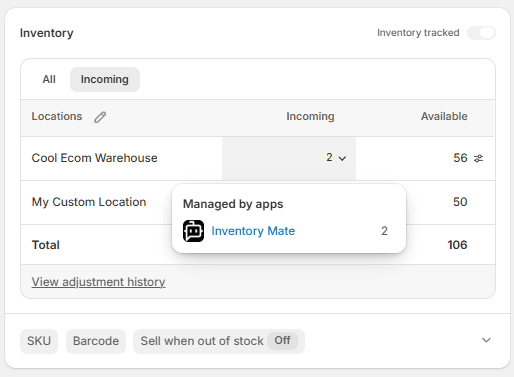
If your team ever opens a product in Shopify Admin and wonders "how much is actually on the way?" — that number now updates automatically from your purchase orders in Inventory Mate.
When stock is running low, the question is never just "what do I have right now?" It's "what's already ordered, and when does it arrive?" Shopify has an Incoming field designed exactly for this — but for most merchants it sits at zero because there's no easy way to keep it accurate.
Inventory Mate now fills that in for you.
What it looks like
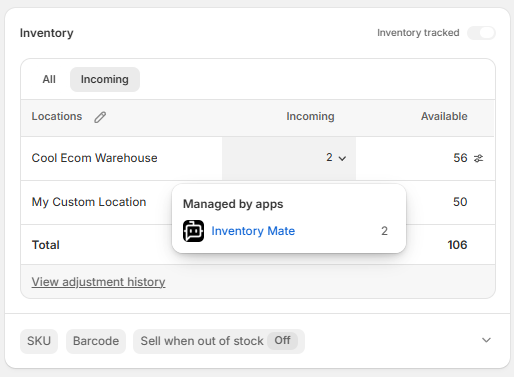
Open any product in Shopify Admin, click the Incoming tab, and you'll see how much is on order at each of your locations — pulled directly from your purchase orders in Inventory Mate. Hover the incoming row and Shopify shows "Managed by apps → Inventory Mate", so anyone on your team knows exactly where the number comes from and who to contact if something looks off.
It just works — no setup, no manual updates
Every time you touch a purchase order in Inventory Mate, Shopify updates automatically:
- Create a PO → incoming goes up for those products at that location
- Edit a quantity or add a product → Shopify adjusts to match
- Receive stock → incoming comes down as goods land
- Change the destination → the old location updates down, the new location updates up
- Delete a PO → Shopify reflects only the orders that remain
The number you see in Shopify always matches the Open PO column on your Stock Replenishment screen. Same data, just surfaced where your whole team can see it.
Why this matters for your team
When incoming is accurate in Shopify, a lot of conversations get easier:
Your buyers don't have to check two systems to know whether to reorder. If incoming is already covering the gap, Shopify tells them before they even open Inventory Mate.
Your operations team can see what's arriving at each location without needing access to your purchasing tools. The right number is already in the system they work in every day.
Your customer service team can answer "when will this be back in stock?" without escalating. The expected arrival date is right there on the product.
It stays accurate as things change
Purchase orders rarely go exactly to plan. Quantities change, shipments get split, partial deliveries come in. Inventory Mate handles all of it — incoming updates every time you save a PO change, so the Shopify number reflects what's actually still on the way, not what was originally ordered.
The Incoming field in Shopify is genuinely useful once it's accurate. This keeps it that way, automatically, without any extra work from your team.
See how everything works together on the Purchase Order Management docs.