Automatic cost sync at PO receipt
Optional shop setting — automatic cost sync at PO receipt — to update Shopify variant unit cost using perpetual WAC when you receive (formula, example, confirmation flow, and how it differs from Shopify native behavior).
Automatic cost sync at PO receipt is an optional shop setting. When you receive inventory on a purchase order in Inventory Mate, you can recalculate weighted average cost (WAC) and write that value to Shopify as the variant unit cost before on-hand quantities are updated for the receipt. This page explains the perpetual WAC formula, a worked example, how the feature behaves in the app, and how that compares to Shopify’s native cost display.
On each PO, supplier cost stays on the lines; shipping, duties, and other extras stay as cost adjustments. Inventory Mate has two ways to push costs into Shopify. The big difference is when they run:
- SKU COGS report — ad hoc: you open the report, pick a date range of POs, review the weighted average of those purchases, and push manually. Optionally turn on Landed-cost view to allocate cost adjustments across products on each PO (all plans; closest to Stocky-style landed costing).
- Automatic cost sync at PO receipt (this page) — always on once enabled: every time you receive a PO, update Shopify with a weighted average from what’s on hand + this receipt (using the PO line / supplier cost), with a confirmation screen every time.
For the overall receive workflow (quantities, destination, partial receipts), see Purchase order management. Switching from Stocky? See Leaving Stocky for the same workflow in marketing form.
Turning the feature on
Plan: Automatic cost sync at PO receipt is available on Growth, Scale, and Enterprise (and legacy Unlimited). The SKU COGS report (including landed-cost view and push) is available on all plans.
After you upgrade to Growth, Scale, or Enterprise:
- Open your user profile in the top-right corner of Inventory Mate.
- Go to Settings.
- Open the Shop defaults tab.
- Scroll to Automatic cost sync at PO receipt and turn the toggle on.
- Save your shop defaults.
- The next time you receive a PO, confirm the new WAC on the receive screen — then Inventory Mate updates Shopify cost and quantities.
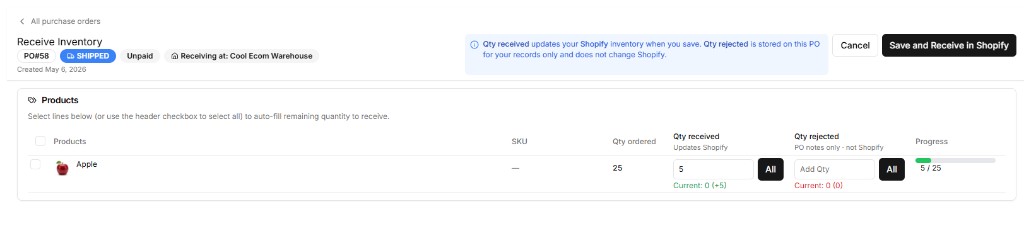
When this is on, each Save from Receive inventory that pushes received quantities to Shopify will first compute a new WAC per inventory item (see below), update Shopify unit cost when applicable, then apply the received quantity deltas to Shopify inventory at the PO destination location.
If the destination row does not resolve to a Shopify location id, automatic cost sync at PO receipt is skipped for that session (quantities can still update as today).
Weighted average cost (WAC) at receipt
At the moment new stock is received, perpetual WAC blends what is already on hand (at all Shopify locations) with this receipt:
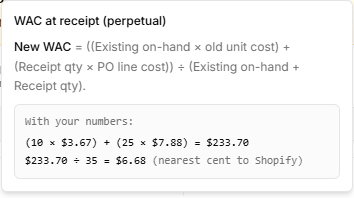
New WAC per unit =
(Existing on-hand qty × Old unit cost + Received qty × New unit cost) ÷ (Existing on-hand qty + Received qty)
- Existing on-hand qty — Physical stock on hand in Shopify, added across every location. This is not the Available number you see in Shopify admin or on Stock Replenishment. Shopify keeps one unit cost per product, not a cost per location, so stock at other locations is part of the same cost. A unit reserved for a draft order is still on the shelf, so it still counts.
- Old unit cost — Live Shopify variant unit cost for that inventory item (when Shopify has no cost, the shelf leg is treated as $0 so the formula still runs).
- Received qty — The additional units you are receiving in this save (the delta entered on the receive screen).
- New unit cost — The PO line unit cost (supplier cost) for that line (if several PO lines share the same inventory item in one save, receipt quantities and dollar value are merged so the “new cost” leg is value-weighted across those lines). Cost adjustments (shipping, duties, etc.) are not folded into this receipt leg — use SKU COGS → Landed-cost view when you want those extras allocated into Shopify unit cost.
That recalculates cost per unit to reflect a blended value of existing stock and newly purchased goods at the instant of receipt.
Shopify keeps one unit cost per inventory item, not a cost per location. If the same SKU is on the shelf at other locations, those units are included in the existing-on-hand leg so the new WAC is not overstated by receiving into a location that happens to have little stock. Received quantities still post only to the PO destination.
This path is transactional at receive: it uses live Shopify quantities and PO line costs at save time. For landed costing (shipping/duties allocated across the PO), use the SKU COGS report’s landed-cost view and push — that is a date-range review flow, not the same as automatic cost sync at PO receipt.
Worked example (perpetual method)
Initial inventory: 100 units at $10.00 each → $1,000 total value.
New receipt: 50 units at $13.00 each → $650 total value.
- New total value: $1,000 + $650 = $1,650
- New total units: 100 + 50 = 150
- New WAC per unit: $1,650 ÷ 150 = $11.00 per unit
Inventory Mate applies the same structure when the toggle is on: existing leg from Shopify on-hand at all locations, receipt leg from your PO line cost and receive delta. Quantities from this receive still post to the PO destination only.
Confirmation before updating Shopify
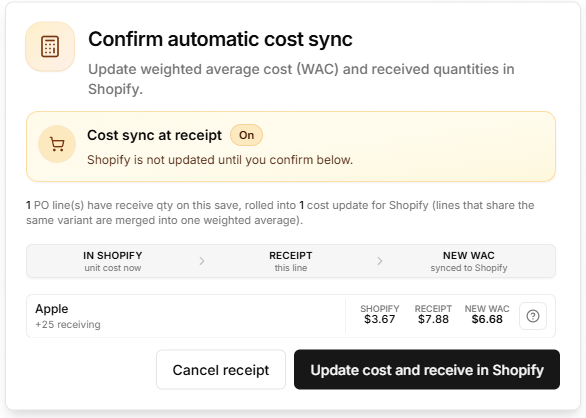
Whenever automatic cost sync at PO receipt is on and the app is about to write new WAC to Shopify for one or more lines on this save, it always opens a confirmation first.
You will see each affected line with on hand (qty × current cost, all locations), this receipt, Shopify unit cost, and new WAC, plus a help (?) control that expands the formula: already on hand + just received = the blended average written to Shopify. Missing Shopify cost is treated as $0 in the on-hand leg.
You can:
- Cancel receipt — No Shopify cost update, no Shopify quantity update, and the PO is not saved for that attempt.
- Update cost and receive in Shopify — The app writes the new WAC to Shopify first, then applies received quantities, then saves the purchase order as usual.
Shopify’s native behavior (context)
Shopify does not natively maintain a full perpetual WAC ledger in standard inventory reporting the way many accounting systems do. In practice, Shopify often reflects a recent or edited purchase cost for a variant rather than a continuously rolled weighted average across every receipt.
For accurate perpetual WAC tied to receipts, merchants often rely on accounting integrations or inventory apps that compute averages and write costs back to Shopify (or to the books) explicitly.
Automatic cost sync at PO receipt does that for you. It calculates the new average from stock already on hand at every location plus this receipt, writes that unit cost to Shopify, and then increases the received quantities.
Use your own accounting and tax judgment: WAC in Shopify affects how you interpret margins in Admin; it does not replace formal inventory accounting or a dedicated ERP.
Related documentation
- Purchase order management — Creating POs, receiving, partial receipts, and how quantities flow to Shopify.
- SKU COGS & weighted average cost — Date-range PO average, landed-cost view, push rules, and how that differs from automatic cost sync at PO receipt.